How to Delete Your Account
If you wish to delete your account and all associated data from our app, please follow these step-by-step instructions. This process is irreversible, so please make sure you want to proceed.
Open the App and Navigate to Account Section
Launch the app on your device and make sure you're logged into your account. Tap on the Account icon to access the Account menu.
Locate the "Delete Account" Option
Scroll through the account settings until you find the "Delete Account" option. It is typically located at the bottom of the account settings page for safety reasons.
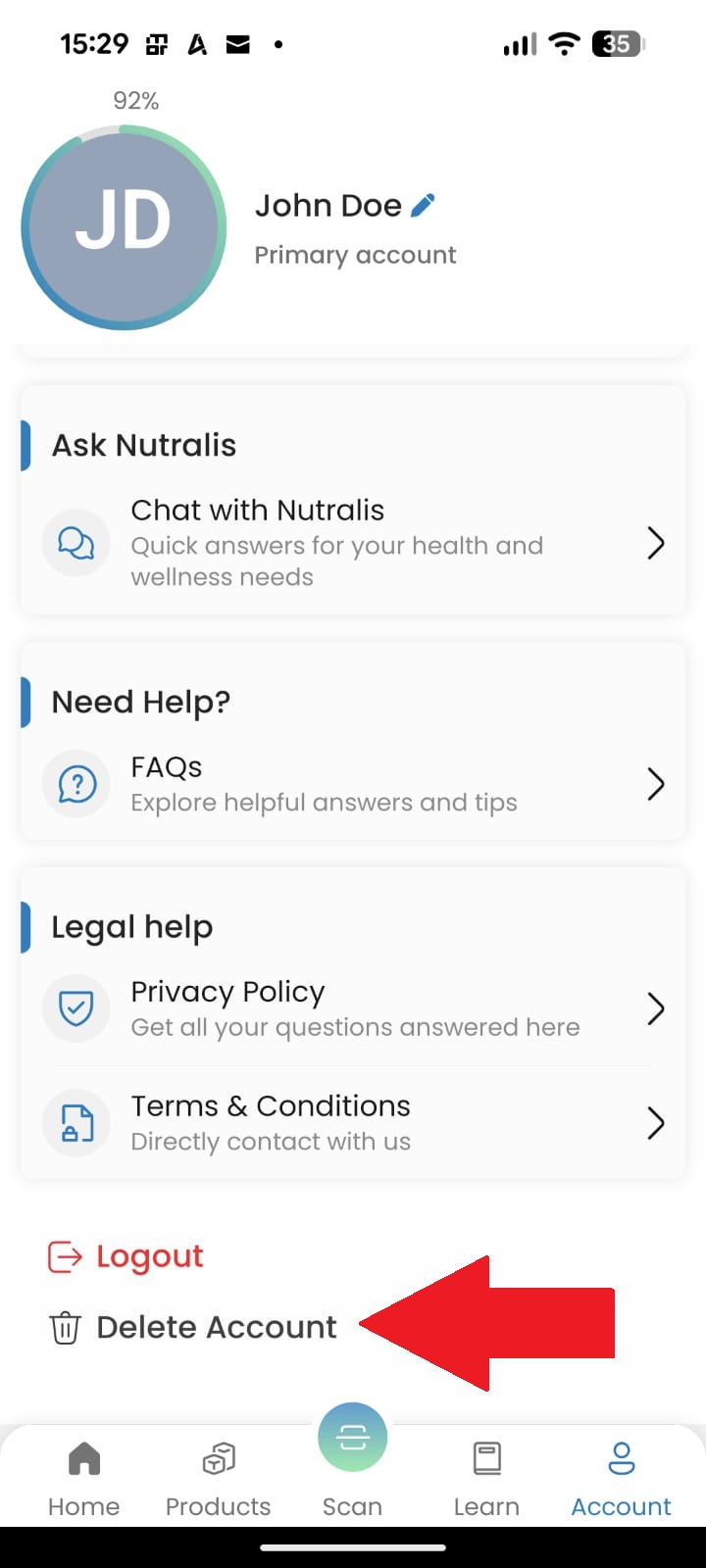
Screenshot showing the "Delete Account" link in the Account section (replace with your actual screenshot)
Note: The screenshot above shows where to find the "Delete Account" option in the app. In your app, it should look similar and be clearly labeled.
Confirm Account Deletion
After tapping "Delete Account", you'll be asked to confirm your decision. You may need to enter your password or verify your identity to proceed.
Review Data Deletion Information
The app will show you what data will be permanently deleted. Review this information carefully before proceeding.
Finalize Deletion
Tap on "Delete My Account" or similar final confirmation button. Your account and all associated data will be scheduled for deletion.
Important Things to Know Before Deleting
- Account deletion is permanent and cannot be undone.
- All your personal data, preferences, and history will be permanently removed from our systems.
- If you have an active subscription, please cancel it before deleting your account to avoid future charges.
- You may want to download your data before deletion if you wish to keep a record of your activity.
- After deletion, you will not be able to recover your account or any associated data.
Data Retention Policy: Following account deletion, some anonymized data may be retained for analytical purposes as outlined in our Privacy Policy. All personally identifiable information will be permanently deleted from our active databases within 30 days. Backup copies may be retained for up to 60 days as part of our disaster recovery procedures.
Need Help or Have Questions?
If you're having trouble deleting your account or have questions about our data practices, please contact our support team.
Contact Support